
特定のオブジェクトの周りに、オブジェクトをランダム配置させたいという場面に遭遇しました。
今回は、中央にある赤いオブジェクトを起点にし、周囲に適当なオブジェクトを設定する方法について触れます。

数学的なお話
今回は円状に配置するので、ランダムで設定した座標XとYが指定した円の長さの中に含まれるかどうかを判定します。
半径Rの円の中に含まれるかどうかの判定は、次の公式を元にします。
半径の2乗は、X軸の2乗とY軸の2乗を足した値と同じ。
R2 = X2 + Y2
つまり、半径の2乗以内であれば円の中であると言えます。
実装方法
今回はオブジェクトに近すぎる場所には設定ませんのでドーナツ状になります。
ソース
using System;
using System.Collections;
using System.Collections.Generic;
using UnityEngine;

public class circlecontroller : MonoBehaviour {

    [Header("分布")]
    [SerializeField] Transform CenterPosition;                 // 対象オブジェクト
    [SerializeField] int ArrangementMaxRedius = 1000;         // 配置位置の最大半径
    [SerializeField] int ArrangementMinRedius = 500;         // 配置位置の最小半径
    [SerializeField] int ArrangementHeight = 10;              // 配置位置の高さ


    [Header("個数")]
    [SerializeField] GameObject CreaturePrefab;                 // 対象オブジェクト
    [SerializeField] int CreatureLength = 100;                 // 配置位置の最大


    private System.Random random;                               // 乱数機

    // Use this for initialization
    void Start () {

        GameObject[] CreatureRange = new GameObject[CreatureLength];
        random = new System.Random();

        int x;
        int z;

        double xAbs;
        double zAbs;

        double maxR = Math.Pow(ArrangementMaxRedius, 2);
        double minR = Math.Pow(ArrangementMinRedius, 2);

        for (int i = 0; i < CreatureRange.Length; i++)
        {
            while (CreatureRange[i] == null){
                x = random.Next(-ArrangementMaxRedius, ArrangementMaxRedius);
                z = random.Next(-ArrangementMaxRedius, ArrangementMaxRedius);

                xAbs = Math.Abs(Math.Pow(x, 2));
                zAbs = Math.Abs(Math.Pow(z, 2));

                // 特定の範囲内化確認
                if (maxR > xAbs + zAbs && xAbs + zAbs > minR)
                {
                    GameObject go = Instantiate(
                        CreaturePrefab,             // 個体のオブジェクト
                        (new Vector3(x, ArrangementHeight, z)) + CenterPosition.position,        // 初期座標
                        Quaternion.identity         // 回転位置
                    );
                    CreatureRange[i] = go;
                }
            }
        }

    }

    // Update is called once per frame
    void Update () {

    }
}
実行例
実行すると次のように、中心のオブジェクトに対して周囲にランダム設定されます。
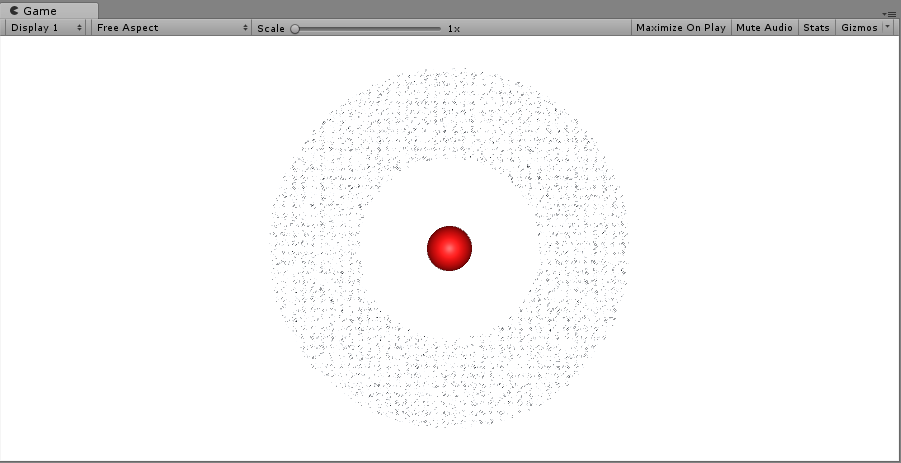
今回は、配置位置が整数型ですが小数型(float)にすればもっときめ細かくなります。
また、3軸を指定すれば円に設定することも出来ます。
